What you need to start a blog
You’ve decided to start a blog. That’s the exciting part.
Now comes the part that trips up most beginners: actually launching it. Between choosing platforms, registering domains, installing themes, configuring settings, and everything else, the process can quickly feel like wandering through a maze without a map.
Most setup guides either oversimplify (“Just click install and you’re done!”) or overwhelm you with every possible option and technical detail you might encounter. Neither approach helps when you’re trying to launch your blog without spending weeks researching or second-guessing every decision.
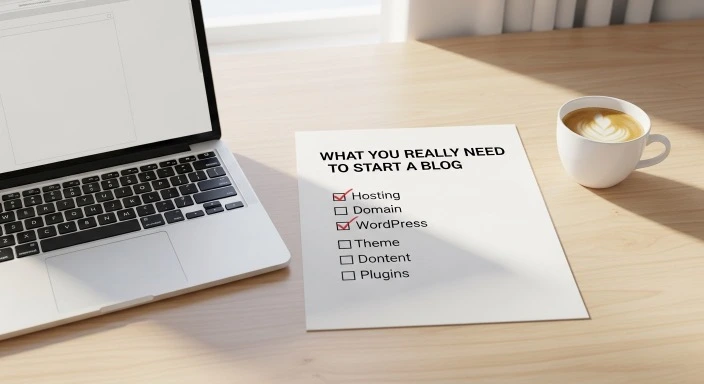
This guide takes a different approach. We’ll walk through exactly what you really need to start a blog in a logical sequence that keeps you moving forward without getting stuck in decision paralysis or technical rabbit holes. You’ll understand what actually matters for getting started versus what you can figure out later.
By the end, you’ll have a clear picture of the genuine requirements for starting a blog, without the overwhelm or unnecessary complexity.
Who This Guide Is For (And Who It’s Not For)
This guide is for you if:
- You’ve decided to start a blog but feel confused about what’s actually required
- You’re on a limited budget and need to know the minimum viable investment
- You want to separate genuine necessities from optional extras
- You’re ready to start but worried you’re missing something important
This might not be for you if:
- You’re already blogging and looking for advanced optimization strategies
- You want to launch a full-scale business immediately with every possible tool
- You’re comfortable with technical setup and know exactly what you need
The Two Categories of Blogging Requirements
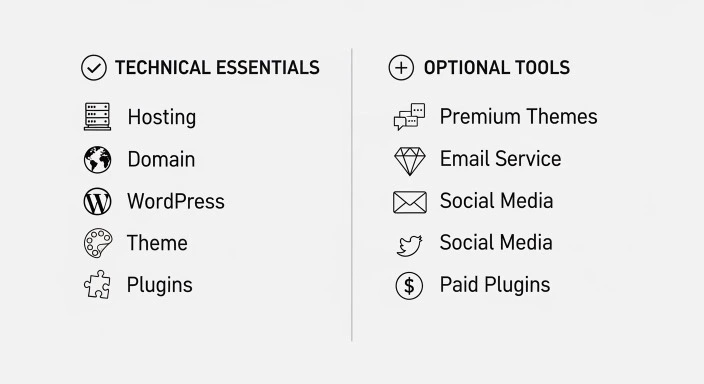
Before we dive into specifics, it helps to understand that blogging requirements fall into two distinct categories.
The Technical Essentials
These are the non-negotiable items you genuinely cannot blog without. They make your blog exist on the internet and allow you to publish content. Without these, you literally don’t have a blog.
The Operational Tools
These are resources that make blogging easier, faster, or more effective, but they’re not required to get started. Many successful blogs operated without these tools initially and added them later as needs became clear.
Beginners get overwhelmed because they try to acquire everything in both categories simultaneously. Understanding this distinction helps you focus on what actually matters for launching.
The Technical Essentials: What You Genuinely Need
A Domain Name
Your domain name is your blog’s address on the internet—the “BloggingforBusyPeople.com” that people type into their browsers to find you.
Cost: $10-15 per year
You can register domains through companies like Namecheap, Google Domains, or directly through your hosting provider. Many hosting companies include a free domain for your first year, which makes starting even more affordable.
What you need to know:
Choose a .com if possible, as it’s what most people default to typing. If your preferred .com is unavailable, .net or .blog work fine too.
Keep it simple and memorable. Complicated spellings or long phrases make it harder for people to find and remember your blog.
Don’t obsess over having the “perfect” domain. Your content matters infinitely more than your domain name. Many successful blogs have mediocre domain names.
You’re not locked into your domain forever. While changing it later involves some work, it’s entirely possible if you decide your initial choice doesn’t fit.
Web Hosting
Hosting is the service that stores your blog’s files and makes them accessible on the internet. Think of it like renting space on a computer that’s always connected to the internet.
Cost: $3-10 per month ($36-120 per year)
The hosting landscape can feel confusing with dozens of companies offering various plans. For busy beginners starting out, you need basic shared hosting—the most affordable option that works perfectly well for new blogs.
According to WebsiteSetup’s hosting research, shared hosting easily handles blogs with up to 25,000 monthly visitors, which covers your entire first year and beyond for most bloggers.
Recommended starting options:
Bluehost offers the simplest beginner experience with one-click WordPress installation and helpful customer support. Plans start around $2.95 monthly and include that free first-year domain.
SiteGround costs slightly more (starting around $3.99 monthly) but provides better performance and faster customer service. Worth the small premium if you value support.
DreamHost sits between the two in pricing (around $2.59 monthly) and offers generous money-back guarantees.
All three handle the technical requirements for new bloggers. Pick one and move forward rather than spending days comparing minute differences in features you won’t use initially.
For a complete walkthrough of the setup process once you’ve chosen hosting, see our guide on how to launch your blog without getting lost in the process.
WordPress Software
WordPress is the software that powers your blog—the platform you’ll use to write posts, customize your design, and manage everything.
Cost: Free
WordPress.org (the self-hosted version, not WordPress.com) is completely free, open-source software. This is what most serious bloggers use because it offers complete control and flexibility.
Your hosting provider will install WordPress for you with a single click. You don’t download it separately or pay for it. It simply comes with your hosting.
Why WordPress specifically:
It powers over 40% of all websites on the internet, according to W3Techs data. This widespread use means abundant tutorials, plugins, and community support.
It’s beginner-friendly while remaining powerful enough for professional publications. You won’t outgrow it.
The ecosystem of free themes and plugins solves most problems you’ll encounter without requiring custom coding.
If you later want to switch platforms (unlikely but possible), WordPress content exports relatively easily.
If you’re still deciding between WordPress and other options, our comparison guide on the ideal blogging platform for beginners with full schedules breaks down the realistic choices.
A Basic Theme
Your theme controls how your blog looks—the colors, layout, fonts, and overall design.
Cost: Free
WordPress includes free themes, and thousands more free options exist in the WordPress theme directory. You don’t need to buy a premium theme to start.
Quality free themes for beginners:
GeneratePress offers a clean, fast design that works well on mobile devices. The free version handles everything most new bloggers need.
Astra provides similar benefits with a slightly different aesthetic. Also excellent and highly customizable.
Neve delivers modern design with good performance and mobile responsiveness built in.
All three have been downloaded millions of times and receive regular updates. You can trust them to work reliably.
Install themes directly from your WordPress dashboard (Appearance → Themes → Add New). Browse, preview, and activate in minutes without leaving your admin area.
The premium theme question:
Premium themes (costing $40-100) offer more customization options and design variations. They’re nice-to-have, not need-to-have. Start with a quality free theme and upgrade only if you find specific limitations the free version doesn’t address.
Many successful blogs run on free themes indefinitely. Your content and consistency matter more than having premium design features.
Essential Plugins
Plugins add functionality to WordPress. While hundreds of thousands exist, you only need a handful initially.
Cost: Free (with optional paid upgrades)
The genuinely essential plugins:
SEO plugin: Either Rank Math or Yoast SEO (choose one). These help optimize your posts for search engines without requiring technical knowledge. Both offer robust free versions.
Backup plugin: UpdraftPlus backs up your blog automatically to cloud storage. The free version handles basic backup needs. Backing up prevents catastrophic data loss if something goes wrong.
Security plugin: Wordfence or Sucuri Security protect against common threats. Free versions provide adequate protection for new blogs.
Contact form plugin: WPForms or Contact Form 7 let readers contact you. Free versions create simple, functional contact forms.
That’s genuinely all you need initially. Four plugins. Maybe five if you want to add Akismet for spam comment protection (comes pre-installed with WordPress but requires activation).
Resist the temptation to install every plugin that sounds useful. Each plugin adds complexity and potential security vulnerabilities. Add plugins only when you have a specific problem they solve.
Your Time and Effort
This isn’t a purchase, but it’s definitely a requirement. You need to commit time to:
Initial setup: 3-5 hours to get your blog online with basic configuration Regular writing: 2-10 hours per week depending on your publishing frequency Learning: Ongoing time to improve your skills and understand how everything works
No amount of money eliminates the time requirement. Blogging requires consistent effort to succeed. If you genuinely can’t commit a few hours weekly, blogging might not fit your current life situation.
If you’re wondering how to fit blogging into a packed schedule, our article on blogging efficiently when you have minimal free time offers practical strategies for making consistent progress.
What You Don’t Actually Need (Despite What You’ll Hear)
Premium Anything on Day One
Premium themes, premium plugins, premium hosting—none of it is necessary for starting. Free options handle everything beginners need.
The premium versions offer more features, better support, or advanced functionality. You’ll know if and when you need these upgrades based on actual limitations you encounter.
Starting with premium products doesn’t make your blog more successful. It just means you spent more money before knowing whether you’ll stick with blogging.
An Email Marketing Service Immediately
Email list building is important eventually, but you don’t need it on day one.
Most email services offer free tiers for small lists (under 500-1,000 subscribers). You can add email signup forms after publishing your first 5-10 posts and start collecting subscribers then.
Focusing on email marketing before you have any traffic or content just adds unnecessary complexity to your launch process.
Social Media Presence Across All Platforms
You don’t need to be on Instagram, Pinterest, Twitter, Facebook, TikTok, and LinkedIn simultaneously.
Many successful blogs rely entirely on search engine traffic and don’t use social media at all. Social media can help, but it’s optional—especially initially when you should focus on creating content and understanding your audience.
If you do use social media, pick ONE platform where your target audience actually spends time. Master that before considering others.
Professional Photos or Custom Graphics
Stock photos from free sites like Unsplash or Pexels work perfectly fine. Simple graphics created with free tools like Canva handle your needs.
Hiring photographers or graphic designers makes sense once you’re earning money from your blog. Starting out, free resources are more than adequate.
A Logo or Professional Branding
Your blog’s name in a nice font works as your “logo” initially. You don’t need custom design work to start publishing.
Consistent, helpful content builds your brand more effectively than visual branding elements. Focus your energy and budget there.
Technical Skills or Coding Knowledge
Modern WordPress requires zero coding ability. Everything happens through visual interfaces and point-and-click editors.
You will need to learn how WordPress works, but this is “figuring out where buttons are” learning, not “learning to code” learning.
If you can use Microsoft Word and navigate websites, you have enough technical foundation to start a WordPress blog.
The Realistic Total Cost to Start
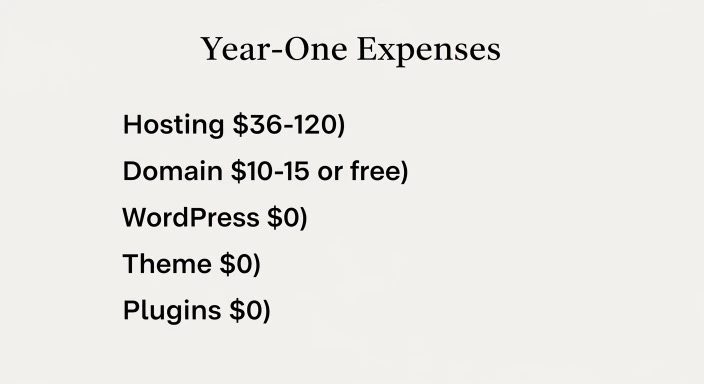
Let’s add up what you genuinely need:
Year One Costs:
- Domain name: $10-15 (free if included with hosting)
- Web hosting: $36-120
- WordPress: $0
- Basic theme: $0
- Essential plugins: $0
Total minimum: $36-120 for your first year
If your hosting includes a free domain, you’re looking at just the hosting cost. Under $50 is entirely realistic.
Optional but common additions might include:
- Premium theme: $40-80 (wait 2-3 months to see if you need this)
- Email marketing service: $0-10/month (free tiers work initially)
- Premium plugins: $0-100/year (add only as specific needs arise)
Even with some optional additions, most beginners can start a serious blog for under $200 in year one.
This is dramatically less than most new hobbies or side projects cost. Compare it to the equipment costs for photography, woodworking, or even fitness classes.
The Actual Setup Timeline
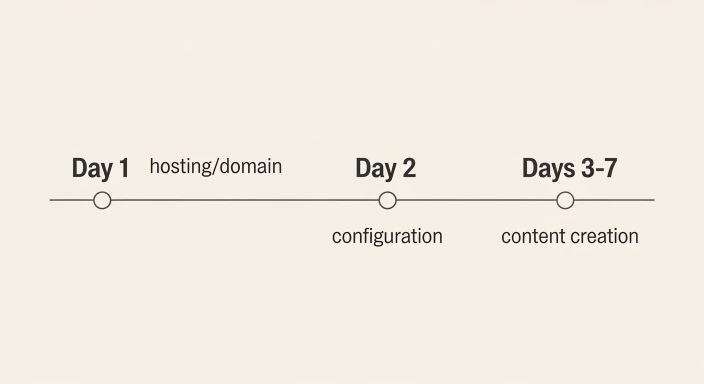
Understanding how long setup takes prevents frustration and helps you plan.
Day 1 (2-3 hours):
- Choose and purchase hosting
- Register domain name
- Install WordPress
- Choose and activate theme
- Configure basic settings
Day 2 (1-2 hours):
- Install essential plugins
- Create About and Contact pages
- Set up basic customization (colors, logo if you have one)
Days 3-7 (4-8 hours total):
- Write first 3-5 blog posts
- Learn basic SEO optimization
- Set up Google Analytics
- Configure any remaining settings
Total setup time: 7-13 hours over one week
You can compress this into a single weekend if needed, but spreading it across a week prevents decision fatigue and gives you time to think through choices without rushing.
After this initial week, you’re publishing content rather than doing technical setup.
For step-by-step guidance through this entire process, check out our detailed walkthrough on how to launch your blog without getting lost in the process.
Skills You’ll Need (And How to Acquire Them)
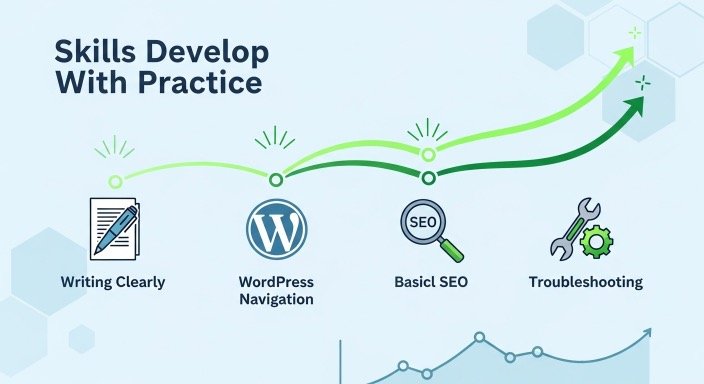
Writing Clearly
You don’t need to be Shakespeare. You need to communicate your ideas in a way readers understand and find helpful.
This skill improves with practice. Your first posts will be rougher than your fiftieth post, and that’s completely normal.
Read blogs you admire and notice how they structure posts, explain concepts, and engage readers. You’ll naturally absorb effective writing patterns.
Basic WordPress Navigation
You need to know where things are in WordPress—how to create posts, add images, install plugins, change settings.
This comes from spending time in the WordPress dashboard. Click around, explore menus, try things. WordPress won’t break from normal use. The worst that happens is you undo a change.
Most hosting providers offer WordPress tutorials. Follow one step-by-step tutorial that shows you around the dashboard, and you’ll have the foundation you need.
Fundamental SEO Concepts
You should understand keywords, meta descriptions, headers, and internal linking at a basic level.
You don’t need to become an SEO expert. You need to know enough to optimize posts for search engines using tools like Rank Math or Yoast that guide you through the process.
Yoast’s SEO training offers free, beginner-friendly explanations of core concepts. A few hours of reading gives you adequate foundation knowledge.
Troubleshooting Problems
You’ll encounter errors, confusing settings, or things that don’t work as expected. You need basic problem-solving skills.
This means knowing how to Google error messages, follow tutorial instructions, and ask for help in forums when you’re stuck.
99% of problems beginners face have been solved before. Someone has written a tutorial or answered the question in a forum. Learning to find and follow these solutions is an essential skill.
Common Beginner Mistakes to Avoid
Buying Everything Before Starting
Some beginners purchase premium themes, multiple plugin subscriptions, email marketing services, and various tools before publishing a single post.
This wastes money and creates pressure to “get your money’s worth” from purchases rather than focusing on creating helpful content.
Start minimal. Add paid tools only when free options prove inadequate for your specific needs.
Choosing Complicated Hosting or Platforms
Beginners sometimes choose VPS hosting, dedicated servers, or overly technical platforms because they sound more professional.
Shared hosting through beginner-friendly companies works perfectly for new blogs. More complex hosting creates more opportunities for technical problems you don’t know how to solve.
Waiting for Perfect Conditions
“I’ll start once I have the perfect domain name / theme / logo / content plan…”
Perfect conditions never arrive. Good enough conditions arrive immediately. Start with good enough, refine as you go.
The biggest mistake is delaying your start while seeking perfection.
Skipping Backups
New bloggers often ignore backups because their blog “doesn’t have much content yet.”
Then a plugin conflict or hacked site wipes everything, and they have no way to recover it. Install UpdraftPlus (or similar) immediately and set up automatic backups. This takes 10 minutes and could save hours or days of work.
Copying Successful Bloggers’ Complete Setups
Established bloggers use dozens of plugins, premium themes, multiple third-party services, and sophisticated workflows.
They built those systems over months or years as their needs evolved. Copying everything they use now overwhelms you unnecessarily.
Start simple. Add complexity only as you encounter specific problems that require specific solutions.
How to Know When You’re Ready to Start
You’re ready to start blogging when you have:
✓ A basic understanding of what blogging involves—if you’ve read our guide on what blogging really involves, you’re set
✓ Enough time to commit 3-5 hours initially for setup, then 2-5 hours weekly for content
✓ $40-120 for first-year hosting and domain costs
✓ A general idea of what you’ll blog about (doesn’t need to be perfectly defined yet)
✓ Willingness to learn as you go rather than knowing everything upfront
That’s genuinely all you need. If you’re waiting for more technical knowledge, more money, more time, or more certainty, you’re overthinking it.
The learning happens through doing, not through preparing to do. Get your blog online, publish your first posts, and figure things out as you encounter them.
What About Money-Making Tools?
Monetization tools—ad networks, affiliate programs, product platforms—don’t belong in the “what you need to start a blog” category.
You don’t need these until you have traffic. Focusing on monetization before you have readers puts the cart before the horse.
When to add monetization:
Ad networks like Google AdSense can be added whenever, but won’t earn much with low traffic. Add them once you’re getting 500+ monthly visitors.
Affiliate programs can be incorporated from your first posts, but research and joining programs takes time. Start publishing first, add affiliate links to relevant posts later.
Product creation makes sense once you understand your audience’s needs. This typically comes after 6-12 months of consistent publishing.
For realistic timelines on blog income, see our guide on when to expect your first blog income.
Focus your initial energy on the foundation: reliable hosting, clean design, and helpful content. Monetization layers onto that foundation later.
Frequently Asked Questions
Can I really start a blog for under $50?
Yes, if you choose budget hosting that includes a free first-year domain. Some hosting companies offer promotional pricing around $2-3 per month for the first year, putting your total cost at $24-36 annually. Combined with free WordPress, free themes, and free plugins, you’re blogging for the cost of hosting alone. Prices typically increase after the first year to $5-10 monthly, but by then you’ll know if blogging fits your life and whether to continue.
What if I can’t afford hosting right now?
You have limited free options. WordPress.com offers free blogs, but with significant restrictions (no custom domain, limited customization, ads on your content). Medium.com lets you publish for free, but you’re building on their platform, not your own site. These work for testing whether you enjoy writing and publishing, but aren’t ideal for building a long-term blog. Save $40-50 and start with self-hosted WordPress when possible—it’s worth the small investment for the control and flexibility.
Do I need different equipment to blog?
No special equipment required. Any computer or laptop made in the last 5-7 years works fine. You can even write and publish posts from tablets or phones using the WordPress mobile app, though a computer makes the process easier. You don’t need a fancy camera (phone cameras work for blog photos), special software (WordPress is your blogging software), or upgraded internet (basic home internet handles blogging). If you can browse websites and send email, your equipment is adequate.
Should I use WordPress.com or WordPress.org?
WordPress.org (self-hosted) is what this guide recommends and what most serious bloggers use. You get complete control, can use any theme or plugin, and own all your content. WordPress.com is a hosting service that uses WordPress software but limits what you can do unless you pay for expensive plans. The “free” WordPress.com option seems appealing but becomes limiting quickly. Self-hosted WordPress.org costs more upfront ($40-120/year) but offers far more value and flexibility. Think of WordPress.com as renting an apartment with strict rules, WordPress.org as owning your own house. Our platform comparison guide covers this in more detail.
How long before I need to upgrade from the basics?
Most bloggers can run on basic hosting, free themes, and free plugins for their entire first year—sometimes much longer. You’ll know when upgrades make sense because you’ll encounter specific limitations. If your site loads slowly with 10,000+ monthly visitors, upgrade hosting. If your free theme can’t do something you need, upgrade to premium. If a plugin’s free version lacks a feature you genuinely need, upgrade that plugin. Let real needs drive upgrades rather than upgrading preemptively. Many successful blogs never upgrade beyond quality free themes and remain on basic hosting for years.
The Final Thoughts
Starting a blog requires less than most beginners think—both financially and technically.
You need hosting, a domain, WordPress, a decent free theme, and a handful of plugins. That’s the complete technical requirements list for what you really need to start a blog. Everything else is optional, situational, or can wait until later.
The financial barrier is minimal. Under $100 gets you online for a full year. The technical barrier is lower than it appears. Modern WordPress handles complexity behind the scenes, leaving you with straightforward point-and-click interfaces.
What you actually need most is time, consistency, and willingness to learn as you go. The technical and financial requirements are easily met. The commitment to showing up regularly and creating helpful content—that’s what separates successful blogs from abandoned ones.
Stop researching what you might need. You now know what you actually need. The list is short, affordable, and achievable. The next step isn’t gathering more information or waiting for perfect conditions. It’s choosing hosting, getting WordPress installed, and publishing your first post.
Everything you’ll learn about blogging comes from doing it, not from preparing to do it. Get the basics in place and start. You’ll figure out everything else along the way, adding tools and refining your approach based on actual experience rather than speculation about what you might need.
Your blog doesn’t need to be perfect, technically sophisticated, or professionally designed to launch. It needs to exist and contain helpful content. Focus on those fundamentals, and everything else will develop naturally as your blog grows.
Our Authority Sources
This article draws on research and guidance from established authorities in blogging, WordPress, and web hosting:
WebsiteSetup – Comprehensive resource for website creation and hosting comparisons, providing detailed analysis of hosting performance, pricing, and beginner-friendliness based on extensive testing across multiple providers.
W3Techs – Web technology survey company that tracks content management system usage across millions of websites, offering objective data on platform adoption and market trends.
Yoast – Leading SEO plugin developer whose educational resources on WordPress optimization, search engine practices, and content strategy are widely trusted in the blogging community for their accuracy and accessibility.